

释放双眼,带上耳机,听听看~!
C#事件
关键点是搞清楚下面几个概念和他们之间的关系
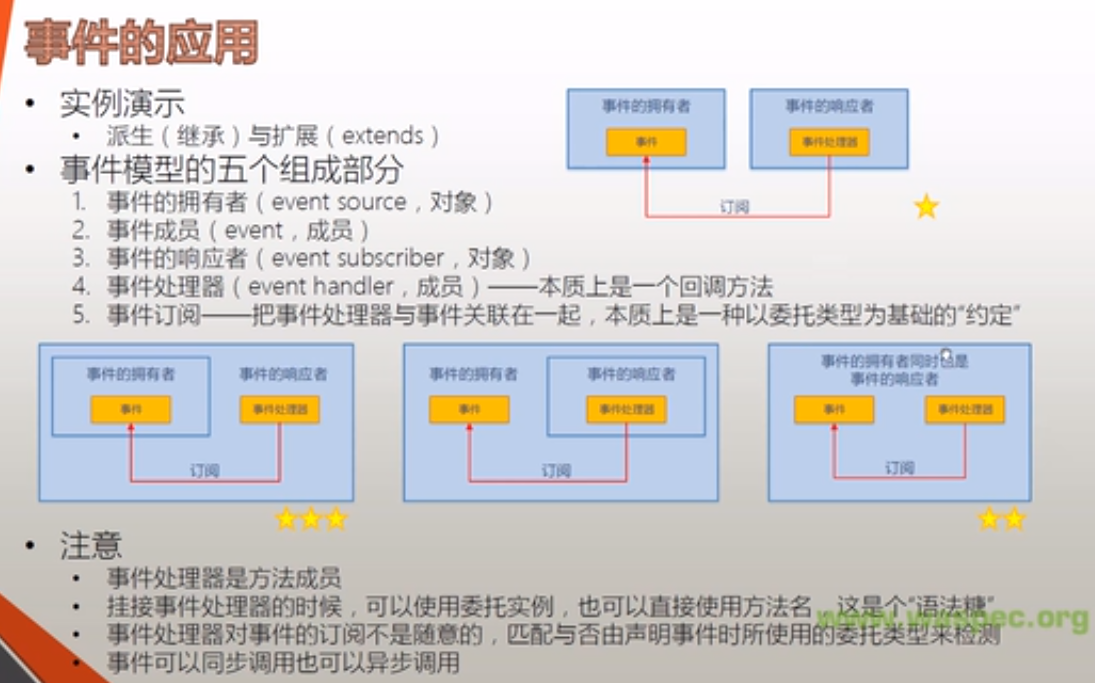
事件模型的五个组成部分
事件的拥有者(event source,对象)
事件成员(event, 成员)
事件的响应者(event subscriber,对象)
事件处理器(event hander, 成员) — 本质上是一个回调方法
事件订阅—把事件处理器与事件关联在一起,本质上是一种以委托类型为基础的“约定”
事件发布和响应者分开的情况
2
3
4
5
6
7
8
9
10
11
12
13
14
15
16
17
18
19
20
21
22
23
24
25
26
27
28
29
30
31
32
33
34
35
36
37
38
39
40
41
42
43
2using System.Collections.Generic;
3using System.Linq;
4using System.Text;
5using System.Threading.Tasks;
6using System.Timers;
7///事件发布和响应者分开的情况
8namespace EventExample
9{
10 class Program
11 {
12 static void Main(string[] args)
13 {
14 Timer timer = new Timer();//事件发布者
15 timer.Interval = 1000;
16 Boy boy = new Boy();//事件响应者
17 Gril gril = new Gril();
18 timer.Elapsed += boy.Action;//事件订阅
19 timer.Elapsed += gril.Action;
20 timer.Start();
21 Console.ReadLine();
22 }
23 }
24
25 class Boy
26 {
27 internal void Action(object sender, ElapsedEventArgs e)
28 {
29 Console.WriteLine("Jump");
30 }
31 }
32
33 class Gril
34 {
35 internal void Action(object sender, ElapsedEventArgs e)
36 {
37 Console.WriteLine("Sing");
38 }
39 }
40}
41
42
43
事件的响应者响应自己的字段成员的事件的情况
2
3
4
5
6
7
8
9
10
11
12
13
14
15
16
17
18
19
20
21
22
23
24
25
26
27
28
29
30
31
32
33
34
35
36
37
38
39
40
41
42
43
44
2using System.Collections.Generic;
3using System.Linq;
4using System.Text;
5using System.Threading.Tasks;
6using System.Windows.Forms;
7///三星例子
8///事件的响应者响应自己的字段成员的事件的情况
9namespace EventExample_3Star
10{
11 class Program
12 {
13 static void Main(string[] args)
14 {
15 MyForm form = new MyForm();
16 form.ShowDialog();
17 }
18 }
19
20 class MyForm : Form
21 {
22 private TextBox textBox;
23 private Button button;
24
25 public MyForm()
26 {
27 this.textBox = new TextBox();
28 this.button = new Button();
29 this.Controls.Add(this.button);
30 this.Controls.Add(this.textBox);
31 this.button.Click += this.ButtonClicked;
32 this.button.Text = "Say Hello";
33 this.button.Top = 100;
34 }
35
36 private void ButtonClicked(object sender, EventArgs e)
37 {
38 this.textBox.Text = "Hello word!!!!!!!!!!!!!";
39 }
40 }
41}
42
43
44
事件处理函数里面的sender参数是为了区分事件的触发者是谁
第二种挂接事件处理器的方法
2
3
2
3
已经废弃的挂接方式
2
3
4
5
2this.textBox1.Text = "haha";
3})
4
5
现在比较流行的一种方法
2
3
4
5
2 this.textBox1.Text = "Hoho";
3}
4
5
一个事件可以同时挂接多个事件处理器。
一个事件处理器也可以同时被多个事件挂接。
