

前面一篇,我们实现了把多个构建所需的变量放在Jenkins服务器能读取的一个json文件里。这一篇,在这个基础之上,我们来进行优化和改进,并且引出新的技巧和知识点。
1.JSON文件放一个网络共享路径
有时候,我们Jenkins服务器不是人人都有权限访问的,特别是生产环境的Jenkins服务器,所以不同人使用不同json文件路径就需要有一个大家共享的文件目录,而且大家都有权限编辑和写入json文件。我想这个共享文件路径,运维人员是很容易给公司内部提供的。前面我把json文件放在了Jenkins所在机器的/tmp/anthony/test.json里。这里我把这个路径改成一个网络路径,也就是模拟实际公司中网络共享文件夹的路径。
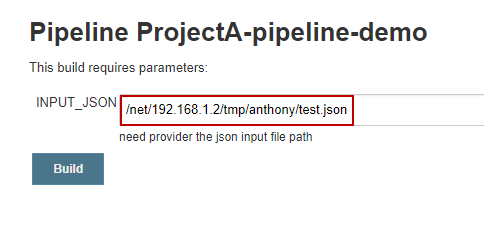
我上面填写的路径是模仿网络共享文件的,不一定正确,而且需要运维帮你设置好一个网络路径是人人可以访问不需要输入密码的那种。
2.解释Java中三元运算符和groovy中三元运算符的简写
这里来解释下面这行代码的意思和优点。
2
3
2is_marry = prop.IS_MARRY? prop.IS_MARRY.trim() : false
3
上面这种写法就是Java中三元运算符的写法,prop.GENDER?表示判断这个变量是否存在,如果存在我们就prop.GENDER.trim(), 如果不存在,我们设置默认值为空字符串。这个三元运算符在开始学习if语句的时候,大家都应该学习过。上面函数trim(), 学习过java或者python都看得懂,就是去除变量值的前后的多余空格,这个写法还是很严谨,我们不可能保证用户就不一定带着多余空格进来。其实在groovy语法中,还有简写版的三元运算符:
2
2
上面意思还是一样,只不过是更加符合groovy的风格,意思性别字段存在吗,如果存在就是里面的值,如果不存在,就设置default这个值。这个缺点就是无法直接trim(),去除前后空格。
3.方法传参采用map格式
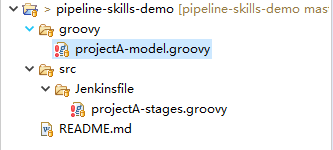
写到这里,我们module.groovy文件还是没有开始写代码。我们读取了Json里面的七个参数和值,只是打印出来。下面我们要换成调用方法的方式去打印出来,这里引出了map的概念,我们先写module.groovy中的一个方法。
项目文件结构和json内容
2
3
4
5
6
7
8
9
10
11
2 "NAME" : "Lucy",
3 "AGE" : "18",
4 "PHONE_NUMBER" : "13912345678",
5 "ADDRESS" : "Haidian Beijing",
6 "EMAIL" : "lucy@demo.com",
7 "GENDER" : "male",
8 "IS_MARRY" : false
9}
10
11
projectA-model.groovy代码如下
2
3
4
5
6
7
8
9
10
11
12
13
14
15
16
17
18
19
20
21
22
23
2def getUserInfo(args) {
3 def name = args.name
4 def age = args.age
5 def phone = args.phone
6 def address = args.address
7 def email = args.email
8 def gender = args.gender
9 def is_marry = args.is_marry
10
11 // she or he
12 def binge = (gender == "male")? "he" : "she"
13 // if is marry
14 def marry = (is_marry == true)? "is marry" : "is not marry yet"
15 def userInfo = """
16 ${name} come from ${address}, ${binge} is ${age} old. ${binge}'s phone number is
17 ${phone}, or you can contact ${binge} via ${email}, ${binge} ${marry}.
18 """
19 println userInfo
20}
21
22return this;
23
最新stage.groovy代码
2
3
4
5
6
7
8
9
10
11
12
13
14
15
16
17
18
19
20
21
22
23
24
25
26
27
28
29
30
31
32
33
34
35
36
37
38
39
40
41
42
43
44
45
46
47
48
49
50
51
52
53
54
55
2
3
4pipeline{
5
6 agent any
7 stages{
8 stage("Hello Pipeline") {
9 steps {
10 script {
11 println "Hello Pipeline!"
12 println env.JOB_NAME
13 println env.BUILD_NUMBER
14 }
15 }
16 }
17
18 stage("Init paramters in json") {
19 steps {
20 script {
21 println "read josn input file"
22 json_file = INPUT_JSON? INPUT_JSON.trim() : ""
23 prop = readJSON file : json_file
24 name = prop.NAME? prop.NAME.trim() : ""
25 println "Name:" + name
26 age = prop.AGE? prop.AGE.trim() : ""
27 println "Age:" + age
28 phone = prop.PHONE_NUMBER? prop.PHONE_NUMBER.trim() : ""
29 println "Phone:" + phone
30 address = prop.ADDRESS? prop.ADDRESS.trim() : ""
31 println "Address:" + address
32 email = prop.EMAIL? prop.EMAIL.trim() : ""
33 println "Email:" + email
34 gender = prop.GENDER? prop.GENDER.trim() : ""
35 println "Gender:" + gender
36 is_marry = prop.IS_MARRY? prop.IS_MARRY.trim() : false
37 println "is_marry:" + is_marry
38 }
39 }
40 }
41 stage("call a method") {
42 steps {
43 script {
44 println "send the parameter as map type"
45 model_call = load env.WORKSPACE + "/groovy/projectA-model.groovy"
46 model_call.getUserInfo(name:name, age:age, phone:phone, address:address, email:email, gender:gender, is_marry:is_marry)
47 }
48 }
49 }
50 }
51
52}
53
54
55
测试结果
2
3
4
5
6
7
8
9
10
11
12
13
14
15
16
17
18
19
20
21
22
23
24
25
26
27
28
29
30
31
32
33
34
35
36
37
38
39
40
41
42
43
44
45
46
47
48
49
50
51
52
53
54
55
56
57
58
59
60
61
62
63
64
65
66
67
68
69
70
71
72
73
74
75
76
77
78
79
80
81
82
83
84
85
86
87
88
89
90
91
92
93
94
95
96
2Rebuilds build #9
3Rebuilds build #15
4Obtained src/Jenkinsfile/projectA-stages.groovy from git https://github.com/Anthonyliu86/pipeline-skills-demo.git
5Running in Durability level: MAX_SURVIVABILITY
6[Pipeline] Start of Pipeline
7[Pipeline] node
8Running on Jenkins in /var/lib/jenkins/workspace/ProjectA-pipeline-demo
9[Pipeline] {
10[Pipeline] stage
11[Pipeline] { (Declarative: Checkout SCM)
12[Pipeline] checkout
13using credential 03214975-2168-4795-981a-ddd935f62a76
14 > git rev-parse --is-inside-work-tree # timeout=10
15Fetching changes from the remote Git repository
16 > git config remote.origin.url https://github.com/Anthonyliu86/pipeline-skills-demo.git # timeout=10
17Fetching upstream changes from https://github.com/Anthonyliu86/pipeline-skills-demo.git
18 > git --version # timeout=10
19using GIT_ASKPASS to set credentials
20 > git fetch --tags --progress https://github.com/Anthonyliu86/pipeline-skills-demo.git +refs/heads/*:refs/remotes/origin/*
21 > git rev-parse refs/remotes/origin/master^{commit} # timeout=10
22 > git rev-parse refs/remotes/origin/origin/master^{commit} # timeout=10
23Checking out Revision 6f898f56636f4756ec449cf77fae1de319bb7bf9 (refs/remotes/origin/master)
24 > git config core.sparsecheckout # timeout=10
25 > git checkout -f 6f898f56636f4756ec449cf77fae1de319bb7bf9
26Commit message: "add env.WORKSPACE"
27 > git rev-list --no-walk 47632238361533ca98929df778da6149a4fc822d # timeout=10
28[Pipeline] }
29[Pipeline] // stage
30[Pipeline] withEnv
31[Pipeline] {
32[Pipeline] stage
33[Pipeline] { (Hello Pipeline)
34[Pipeline] script
35[Pipeline] {
36[Pipeline] echo
37Hello Pipeline!
38[Pipeline] echo
39ProjectA-pipeline-demo
40[Pipeline] echo
4116
42[Pipeline] }
43[Pipeline] // script
44[Pipeline] }
45[Pipeline] // stage
46[Pipeline] stage
47[Pipeline] { (Init paramters in json)
48[Pipeline] script
49[Pipeline] {
50[Pipeline] echo
51read josn input file
52[Pipeline] readJSON
53[Pipeline] echo
54Name:Lucy
55[Pipeline] echo
56Age:18
57[Pipeline] echo
58Phone:13912345678
59[Pipeline] echo
60Address:Haidian Beijing
61[Pipeline] echo
62Email:lucy@demo.com
63[Pipeline] echo
64Gender:male
65[Pipeline] echo
66is_marry:false
67[Pipeline] }
68[Pipeline] // script
69[Pipeline] }
70[Pipeline] // stage
71[Pipeline] stage
72[Pipeline] { (call a method)
73[Pipeline] script
74[Pipeline] {
75[Pipeline] echo
76send the parameter as map type
77[Pipeline] load
78[Pipeline] { (/var/lib/jenkins/workspace/ProjectA-pipeline-demo/groovy/projectA-model.groovy)
79[Pipeline] }
80[Pipeline] // load
81[Pipeline] echo
82
83 Lucy come from Haidian Beijing, he is 18 old. he's phone number is
84 13912345678, or you can contact he via lucy@demo.com, he is not marry yet.
85
86[Pipeline] }
87[Pipeline] // script
88[Pipeline] }
89[Pipeline] // stage
90[Pipeline] }
91[Pipeline] // withEnv
92[Pipeline] }
93[Pipeline] // node
94[Pipeline] End of Pipeline
95Finished: SUCCESS
96
总结,上面我们写模块方法的时候参数就写了一个args, 调用方法的时候传了7个map对象进去。然后模块方法中我为什么每个变量前面都加上def, 加上之后模块中的变量都变成了局部变量。这样和已经存在内存中的stage里面的全局变量不会被覆盖和重写。
