释放双眼,带上耳机,听听看~!
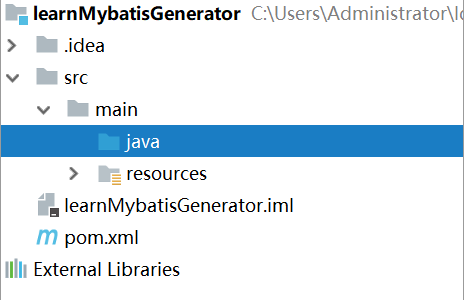
1、IDEA创建maven工程,工程图如下
2、 在maven项目的pom.xml 添加mybatis-generator-maven-plugin 插件和MySQL数据库驱动依赖
2
3
4
5
6
7
8
9
10
11
12
13
14
15
16
17
18
19
20
2 <plugins>
3 <plugin>
4 <groupId>org.mybatis.generator</groupId>
5 <artifactId>mybatis-generator-maven-plugin</artifactId>
6 <version>1.3.5</version>
7 <configuration>
8 <verbose>true</verbose>
9 <overwrite>true</overwrite>
10 </configuration>
11 </plugin>
12 </plugins>
13</build>
14
15<dependency>
16 <groupId>mysql</groupId>
17 <artifactId>mysql-connector-java</artifactId>
18 <version>5.1.34</version>
19</dependency>
20
3、在maven项目下的src/main/resources 目录下建立名为 generatorConfig.xml的配置文件,作为mybatis-generator-maven-plugin 插件的执行目标,模板如下:
2
3
4
5
6
7
8
9
10
11
12
13
14
15
16
17
18
19
20
21
22
23
24
25
26
27
28
29
30
31
32
33
34
2<!DOCTYPE generatorConfiguration
3 PUBLIC "-//mybatis.org//DTD MyBatis Generator Configuration 1.0//EN"
4 "http://mybatis.org/dtd/mybatis-generator-config_1_0.dtd">
5<generatorConfiguration>
6 <classPathEntry location="D:\\my_local_repository\\mysql\\mysql-connector-java\\5.1.34\\mysql-connector-java-5.1.34.jar"/>
7 <context id="mysqltables" targetRuntime="MyBatis3" defaultModelType="conditional">
8 <commentGenerator>
9 <property name="suppressDate" value="true"/>
10 <property name="suppressAllComments" value="true"/>
11 </commentGenerator>
12
13 <jdbcConnection driverClass="com.mysql.jdbc.Driver" connectionURL="jdbc:mysql://127.0.0.1:3306/mybatis" userId="root" password="root">
14 </jdbcConnection>
15
16 <javaTypeResolver>
17 <property name="forceBigDecimals" value="false"/>
18 </javaTypeResolver>
19 <javaModelGenerator targetPackage="main.java.com.edwin.model" targetProject="src">
20 <property name="enableSubPackages" value="true"/>
21 <property name="trimStrings" value="true"/>
22 </javaModelGenerator>
23 <sqlMapGenerator targetPackage="main.java.com.edwin.mapping" targetProject="src">
24 <property name="enableSubPackages" value="true"/>
25 </sqlMapGenerator>
26 <javaClientGenerator type="XMLMAPPER" targetPackage="main.java.com.edwin.dao" targetProject="src">
27 <property name="enableSubPackages" value="true"/>
28 </javaClientGenerator>
29 <table tableName="student" domainObjectName="Student" enableCountByExample="false" enableUpdateByExample="false" enableDeleteByExample="false" enableSelectByExample="false" selectByExampleQueryId="false"></table>
30 <table tableName="clazz" domainObjectName="Clazz" enableCountByExample="false" enableUpdateByExample="false" enableDeleteByExample="false" enableSelectByExample="false" selectByExampleQueryId="false"></table>
31 </context>
32</generatorConfiguration>
33
34
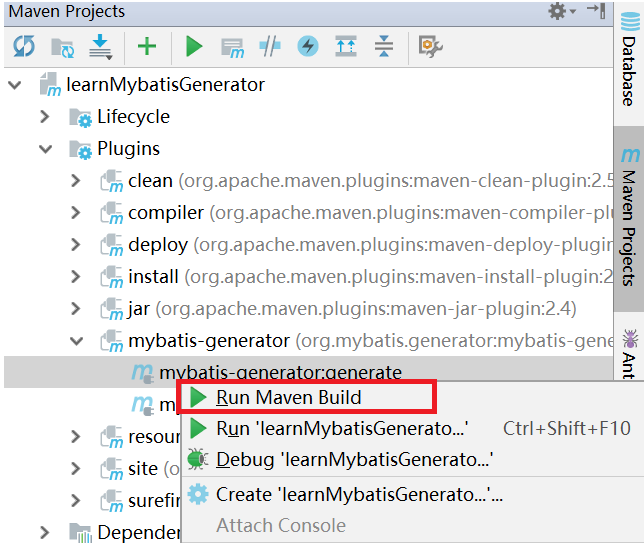
4、使用maven运行mybatis-generator-maven-plugin插件:工程名->Plugins->mybatis-generator->mybatis-generator:generate->Run Maven Build
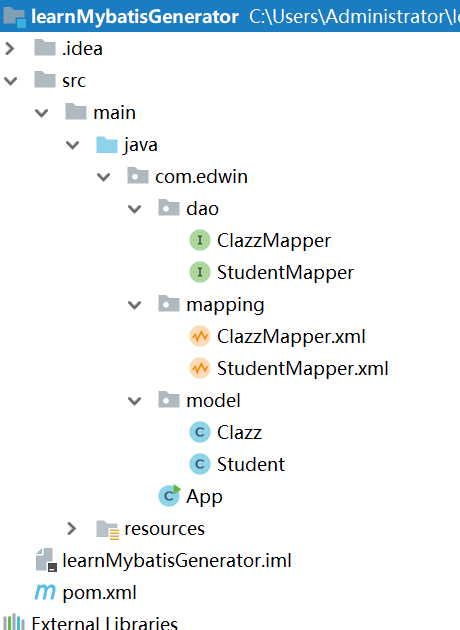
5、自动生成的结构如下: